A2P 10DLC Campaign approval depends on whether your registration clearly explains who is sending messages, what recipients will receive, why they receive them, and how they provided consent. Use this guide before submitting or resubmitting a Campaign to identify common issues with your use case, sample messages, opt-in process, website, Privacy Policy, and Terms & Conditions.
Important: Following these recommendations improves submission quality but does not guarantee approval. Final approval decisions are made by the applicable carriers and registration partners.
TABLE OF CONTENTS
- What Is A2P 10DLC Campaign Vetting?
- Key Benefits of Campaign Approval Best Practices
- Campaign Approval Checklist
- Campaign Use Case and Description
- Sample Messages
- Consent and Web Form Opt-In
- Providing Verifiable Opt-In Proof
- Text Message and Offline Opt-In
- Website, Privacy Policy, and Terms & Conditions
- Restricted and Forbidden Messaging
- How to Prepare Your Campaign for Approval
- What to Do if Your Campaign Is Rejected
- Frequently Asked Questions
- Need Help?
What Is A2P 10DLC Campaign Vetting?
Campaign vetting verifies that your messaging program is accurately represented and that recipients have a clear, verifiable way to consent. Reviewers may compare your Campaign information, sample messages, website, policies, and opt-in experience to determine whether they tell the same consistent story.
A complete submission should clearly establish:
- Brand: Who is sending the messages.
- Use Case: Why messages are being sent.
- Campaign Description: Who receives the messages, what they receive, and how they opt in.
- Sample Messages: What actual messages will look like.
- Opt-In Flow: How recipients provide consent.
- Website: A working website that represents the registered business.
- Privacy Policy and Terms & Conditions: Publicly accessible policies supporting the messaging program.
Key Benefits of Campaign Approval Best Practices
A clear and verifiable submission helps reviewers understand your messaging program without having to make assumptions.
- Fewer avoidable rejections: Identify missing, conflicting, or unverifiable information before submission.
- Clearer consent verification: Make it easy to confirm how recipients agree to receive messages.
- Consistent Campaign information: Keep your use case, description, sample messages, website, and opt-in process aligned.
- Faster troubleshooting: Make rejection reasons easier to identify and correct.
- Stronger compliance: Ensure your registered Campaign accurately reflects the messages you intend to send.
Campaign Approval Checklist
Review the entire customer journey before submitting your Campaign. Every component should support the same messaging purpose and consent process.
Confirm that:
- Your Campaign Use Case matches the messages you plan to send.
- Your Campaign Description identifies the sender, recipients, messaging purpose, and consent method.
- Your sample messages represent messages recipients will actually receive.
- Your business or sender name appears in the sample messages.
- Your website is live, accessible, and represents the registered business.
- Your opt-in process can be verified by a reviewer.
- Consent language clearly explains what messages recipients agree to receive.
- Your opt-out workflow clearly explains how contacts can stop messages and what confirmation they receive.
- Your HELP response identifies the business and provides a valid support method.
- Your Privacy Policy and Terms & Conditions are publicly accessible.
- Your Campaign does not involve restricted or prohibited messaging.
- If your Campaign includes both promotional and informational messaging, your sample messages represent both message types.
Campaign Use Case and Description
The Campaign Use Case identifies the type of messaging you intend to send. The Campaign Description explains how that messaging program operates. Both should accurately reflect what recipients will experience after opting in.
A strong Campaign Description answers four questions:
- Who sends the messages?
- Who receives them?
- What messages will they receive?
- How do recipients provide consent?
Good example:
Acme sends appointment reminders and service updates to existing customers who provide SMS consent through our online appointment form.
Avoid descriptions such as:
This Campaign sends messages to customers.
A generic description does not give reviewers enough information to verify the messaging program.
Sample Messages
Sample messages should represent the actual content recipients can expect and should align with the selected Campaign Use Case and Campaign Description.
Include:
- Your business or sender name.
- Realistic message content.
- The messaging purpose described in your Campaign.
- Appropriate opt-out language.
- Bracketed placeholders where information changes by recipient.
If your Campaign includes multiple message types, make sure the samples represent each type of messaging you plan to send. For mixed messaging, include at least one promotional/marketing example and one transactional/informational example when applicable.Example:
Acme Dental: Hi [First Name], your appointment is scheduled for [Date] at [Time]. Reply STOP to unsubscribe.
Do not submit sample messages for one purpose and then describe a different messaging purpose elsewhere in the registration.
Consent and Web Form Opt-In
Consent should make it clear that the recipient knowingly agrees to receive the type of messages described in your Campaign. A reviewer should be able to understand the consent experience by viewing the form itself.
For web-based opt-in, confirm that the form:
- Clearly identifies the business sending the messages.
- Explains what types of messages the recipient agrees to receive.
- Includes message-frequency information.
- States that message and data rates may apply.
- Provides applicable HELP and STOP instructions.
- Includes accessible Privacy Policy and Terms & Conditions links.
- Does not preselect SMS consent checkboxes.
- Does not require SMS consent simply to submit the form.
- Separates marketing and non-marketing consent when both are collected.
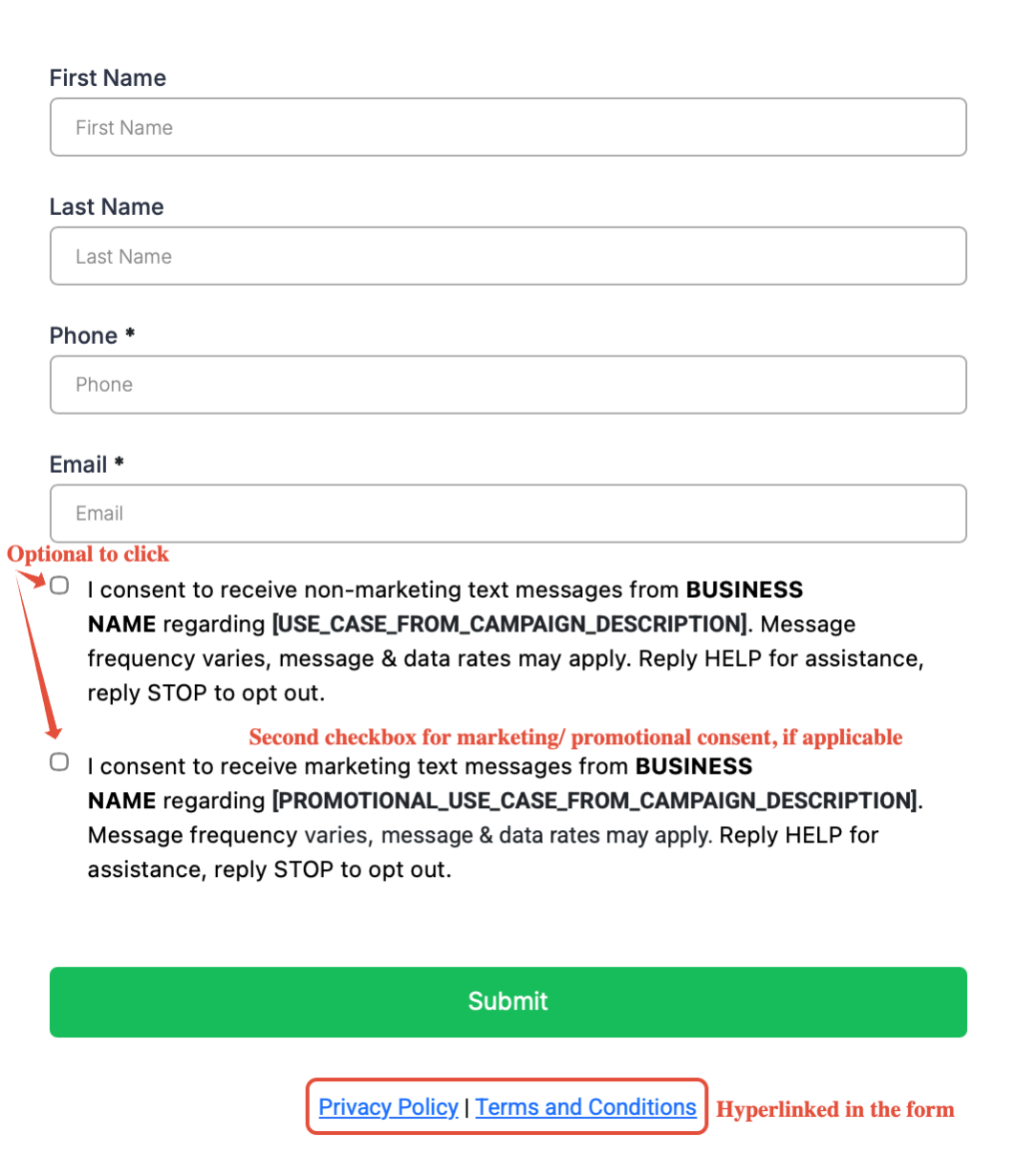
Use separate, optional consent checkboxes when collecting different types of SMS consent. Clearly identify the business, messaging purpose, required disclosures, and accessible Privacy Policy and Terms & Conditions links.
Providing Verifiable Opt-In Proof
Reviewers need to verify the consent method described in your Campaign. When the original opt-in experience cannot be accessed publicly, provide evidence showing exactly what recipients see before providing consent.
Supporting evidence may be necessary for:
- Forms behind a login.
- Paper forms.
- Unpublished or pre-launch pages.
- QR-code opt-in experiences.
- Offline promotional materials.
- Other consent methods that cannot be opened directly by a reviewer.
Upload a clear screenshot of the opt-in experience to your media library and generate a publicly accessible link that can be included as supporting evidence.
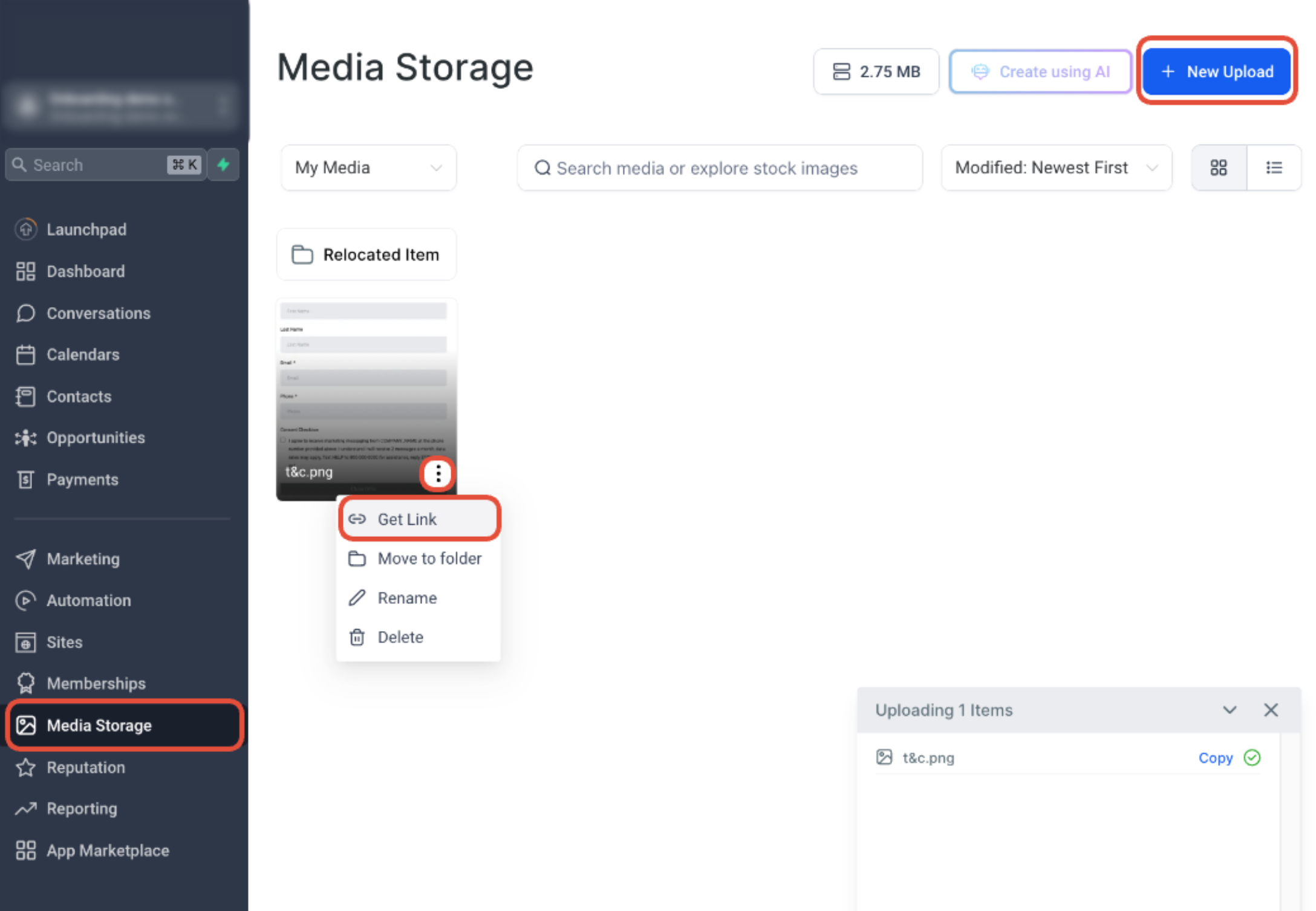
Upload your consent screenshot to Media Storage, open the file menu, and select Get Link. Verify that the resulting link can be opened without requiring the reviewer to sign in.
The evidence should clearly display the consent language and applicable disclosures. Avoid submitting screenshots that crop out important consent information.
Text Message and Offline Opt-In
Text-to-join and offline opt-in methods still require a clear Call to Action before the recipient provides consent.
The Call to Action should identify, as applicable:
- Business or program name.
- Opt-in keyword and destination number.
- Type of messages recipients will receive.
- Message frequency.
- Message and data rate disclosure.
- HELP instructions.
- STOP instructions.
- Privacy Policy and Terms information.
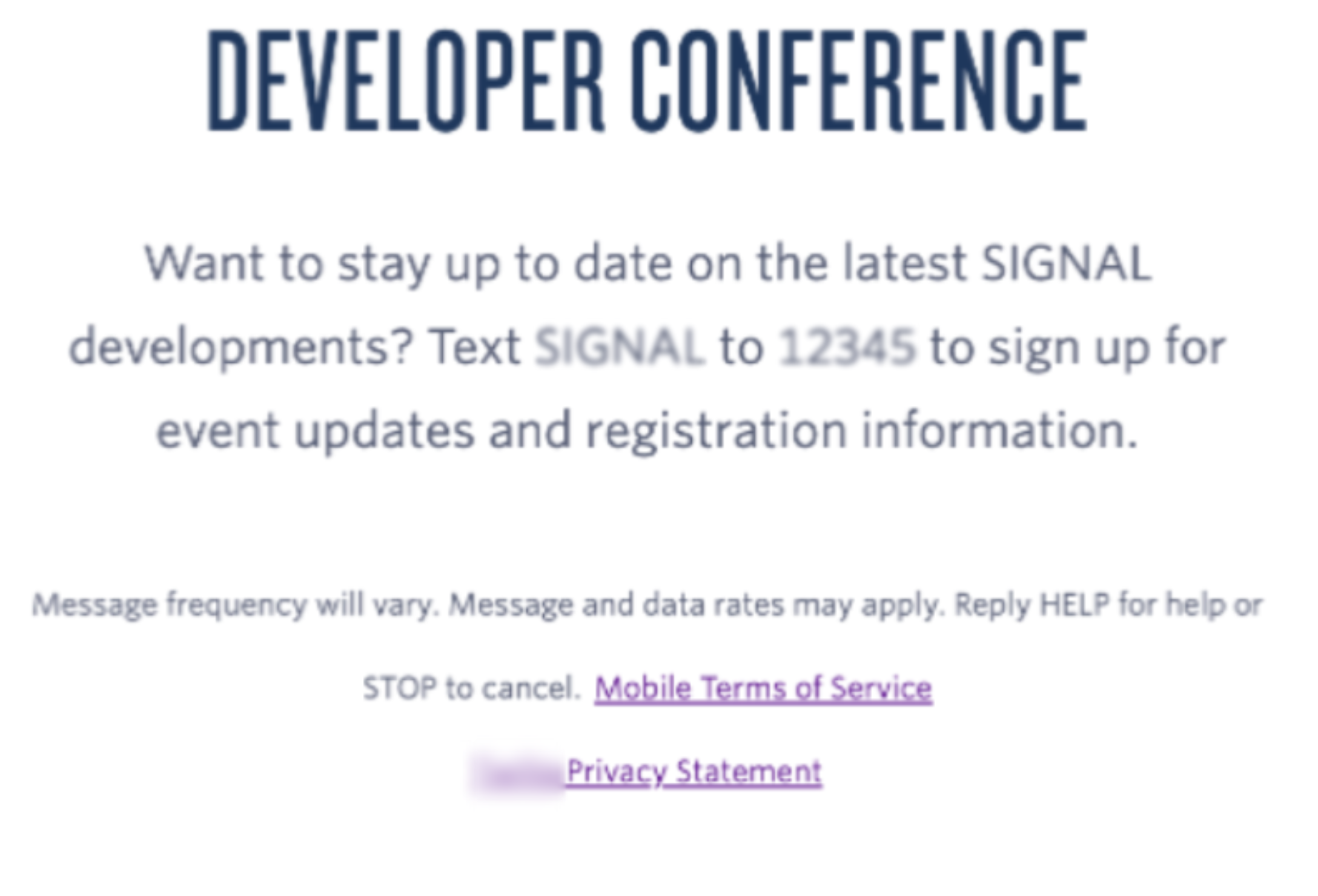
Make the messaging program clear before someone texts the opt-in keyword. Include the program identity, messaging purpose, applicable disclosures, HELP and STOP instructions, and policy information.
HELP and STOP Responses
HELP and STOP responses give recipients a clear way to manage their messaging preferences and get support. These responses should identify your business and provide enough information for recipients and reviewers to understand what happens after a keyword is sent.
- STOP response: Acknowledge the opt-out request, identify the business or brand, and confirm that no further messages will be sent.
- HELP response: Identify the business or brand and provide a valid phone number, email address, or other support contact method.
- Make sure the HELP and STOP behavior described in your Campaign matches the actual messaging experience.
Website, Privacy Policy, and Terms & Conditions
Your website and policies help reviewers verify that the Campaign belongs to the registered business and that the consent process supports the messaging program being submitted.
Before submission, confirm that:
- The website URL works.
- The website represents the registered business or declared business name.
- Business information is consistent with the Campaign.
- The opt-in page is accessible when website opt-in is used.
- Privacy Policy and Terms & Conditions pages are publicly accessible.
- The Privacy Policy appropriately addresses SMS opt-in data and consent.
Restricted and Forbidden Messaging
An available Campaign Use Case does not automatically make every type of messaging eligible for A2P 10DLC. Certain industries, products, services, and message categories may be restricted, prohibited, filtered, or subject to additional requirements.
Potentially restricted categories can include certain financial services, third-party lead generation, debt-related services, controlled substances, gambling, firearms, vaping-related messaging, and other regulated content.
Review the applicable messaging restrictions before registering if you are uncertain whether your business or messaging program is eligible.
How to Prepare Your Campaign for Approval
Reviewing the registration as one complete customer journey makes inconsistencies easier to catch before submission.
- Go to Settings → Phone System → Trust Center.
- Open Brand & Campaigns from the A2P Messaging area.
- Confirm that the registered Brand represents the business sending the messages.
- Select the Campaign Use Case that best matches your messaging purpose.
- Write a Campaign Description that identifies the sender, recipients, messaging purpose, and consent method.
- Add realistic sample messages that match the selected use case.
- Verify your opt-in flow, website, Privacy Policy, and Terms & Conditions.
- Check for inconsistent names, URLs, messaging purposes, or consent language before submitting.
What to Do if Your Campaign Is Rejected
A rejection identifies an issue discovered during Campaign review. Correct the reported issue, but also review the entire Campaign before resubmitting to prevent another inconsistency from causing a second rejection.
- Go to Settings → Phone System → Trust Center.
- Open your A2P Brand and Campaign information.
- Locate the rejected Campaign.
- Review the displayed failure or rejection reason.
- Open any available required-fix information.
- Correct the identified issue.
- Recheck the Campaign Description, use case, sample messages, opt-in flow, website, and policy links.
- Resubmit after confirming the information is consistent.
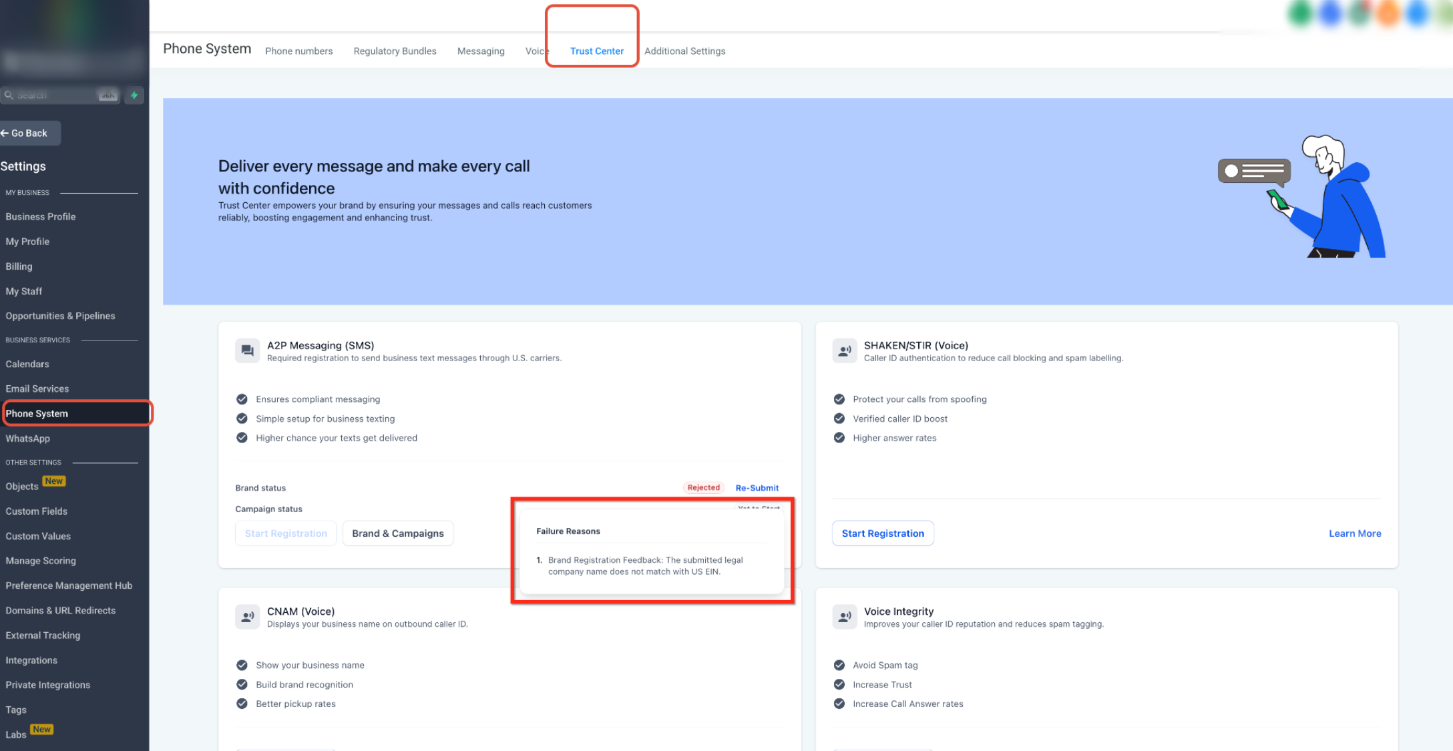
Open the rejected Campaign in Trust Center and review the displayed failure reason before making changes. Correct the reported issue, then review the complete Campaign before resubmitting.
Important: Do not correct only the field mentioned in the rejection. A Campaign is reviewed as a complete messaging program, so other inconsistencies may still prevent approval.
Frequently Asked Questions
Q: Does following every recommendation guarantee Campaign approval?
No. These practices improve submission quality and consistency, but final approval decisions are made by the applicable carriers and registration partners.
Q: Why can a Campaign that looks correct still be rejected?
Reviewers evaluate the entire Campaign. For example, a valid website does not resolve sample messages that conflict with the selected use case or an opt-in process that cannot be verified.
Q: Does my website need to be publicly accessible?
Reviewers need to be able to verify the business website and relevant consent information. If the actual opt-in experience cannot be publicly accessed, provide publicly accessible supporting evidence.
Q: Can I use an opt-in form that is behind a login?
Yes, but provide accessible evidence showing what recipients see before providing consent. The reviewer should not need login credentials to verify the opt-in experience.
Q: Should marketing and non-marketing SMS consent use the same checkbox?
When collecting separate marketing and non-marketing consent, provide distinct choices so recipients can clearly understand what types of messages they are agreeing to receive.
Q: What should I do if my Campaign is rejected more than once?
Review the latest rejection reason, correct the identified issue, and then recheck the entire Campaign before resubmitting. Confirm that the use case, description, sample messages, website, consent process, and policies remain consistent.
Need Help?
If your Campaign is rejected or you are unsure whether it is ready for submission, review the Campaign as a complete messaging journey rather than checking individual fields in isolation.
Before resubmitting, verify that:
- The registered business information is accurate.
- The Campaign Use Case matches the intended messages.
- The Campaign Description clearly explains the messaging program.
- Sample messages match the selected use case.
- The opt-in method is clear and verifiable.
- Required consent disclosures are visible.
- Privacy Policy and Terms & Conditions links work.
- The website represents the registered business.
- Any reported rejection reason has been corrected.
If the Campaign continues to be rejected, capture the displayed rejection reason and review the complete submission before contacting support. Providing the Campaign details and rejection information will help make troubleshooting more efficient.